What it takes to build an agent
Agents are supposed to change how we work, and some are pitched as replacements for workers. But are they really that simple to build and manage? In this article, we’ll look under the hood to see how they work and the complexity to build.


Agents are supposed to change how we work, and some are pitched as replacements for workers. But are they really that simple to build and manage? In this article, we’ll look under the hood to see how they work and the complexity to build.
Why “agent” confuses people
When most people think of an agent, they picture OpenAI’s ChatGPT or Microsoft’s Copilot summarizing a search in Bing. A few years ago, that’s what I pictured too, but as I started developing agents of my own, I realized that is only a small portion of the capability. OpenAI defines agents as “systems that independently accomplish tasks on your behalf.”1 By that definition, simple chatbots are not agents, even when they use LLMs, because the model isn’t controlling the work.
The difference is that an agent uses an LLM to make decisions as it runs a workflow, while legacy systems are deterministic; in other words, they follow conditional logic. Legacy systems were forced into an if-then structure, while agents draw on a variety of capabilities to decide what to do next. Putting an LLM in charge of the workflow lets it make judgment calls and take actions that fixed code can’t anticipate, within the tools and limits it has been given. If you only use ChatGPT, Claude or Copilot to ask questions and get answers, you’re seeing a small portion of what AI can do. Agents are where the bigger gains show up.
You don’t need to be a developer
Claude Code and Codex opened the agentic space to non-developers. Tools for building agents range from no-code platforms, to low-code frameworks that take some scripting, to pro-code tools like Claude Code and Codex, where an agent writes the code and you direct it. I’m not a developer myself; my only coding experience was a few college classes twenty years ago. If I can use these tools, so can you. With some technical aptitude, curiosity, and a willingness to learn, you can build webpages, applications, agents, and much more. And if you’re using Claude Code or Codex, you’re already using agents: they do the work while you direct it. Ask it to build something and it will typically spin up a prototype in minutes or hours depending on the complexity. Plan out your build and it may ask you some functional and technical questions. If you don’t understand why the agent decided, or is asking you a questions, ask it to explain.
If you haven’t tried them, I highly recommend it. Both are included in the $20/month plans: Anthropic’s Claude Pro for Claude Code, and OpenAI’s ChatGPT Plus for Codex.2 These videos are good introductions:
Claude Code was my first introduction to coding agents. Using it for the first time, I knew it would change how I work. I couldn’t write code, yet I could spin up an entire website with a few prompts. Fast-forward to today, and I’m building full-stack applications (not production grade, but they work for me). Best of all, the tools keep getting better with every new Large Language Model released.
The Models
The large language model matters, because each model’s abilities vary. Each lab offers several tiers, some fast and inexpensive, others more capable: OpenAI’s GPT-6 models (Luna, Sol and Astra), and Anthropic’s Haiku, Sonnet and Opus, plus its new top-tier Fable model. All of them can read, reason in language and write. What none of them can do on their own is remember past conversations, take action, reach your systems or know your company’s policies.
Think of the model as the brain of the operation. In people, the brain tells the body what to do. But a brain is limited to what it has learned, and a model only knows what was in its training data, frozen at a point in time.
Imagine a Renaissance engineer working 500 years ago. They could reason, test ideas and solve mechanical problems, but they lacked the accumulated standards, computing tools and shared technical infrastructure we have today. A modern engineer accomplishes more largely because of the environment they work in, and their mind is much the same.
Models work the same way. You can upgrade the brain by moving to a newer, more capable model. Or you can upgrade the environment by building around the model, adding context, memory, skills, MCP servers and software. Anthropic calls this an “augmented LLM,” the basic building block of every agentic system.3 The second path is where agents come from.
Memory and context
Large language models change their answers based on the context you give them. Ask a model about yourself and, unless you’re well known, it likely knows nothing about you. It may even invent something. If the app gives it a web search tool, it might find your LinkedIn profile. Attach your resume and ask again, and you’ll get a far better answer. Same model, same brain; the difference is the context.
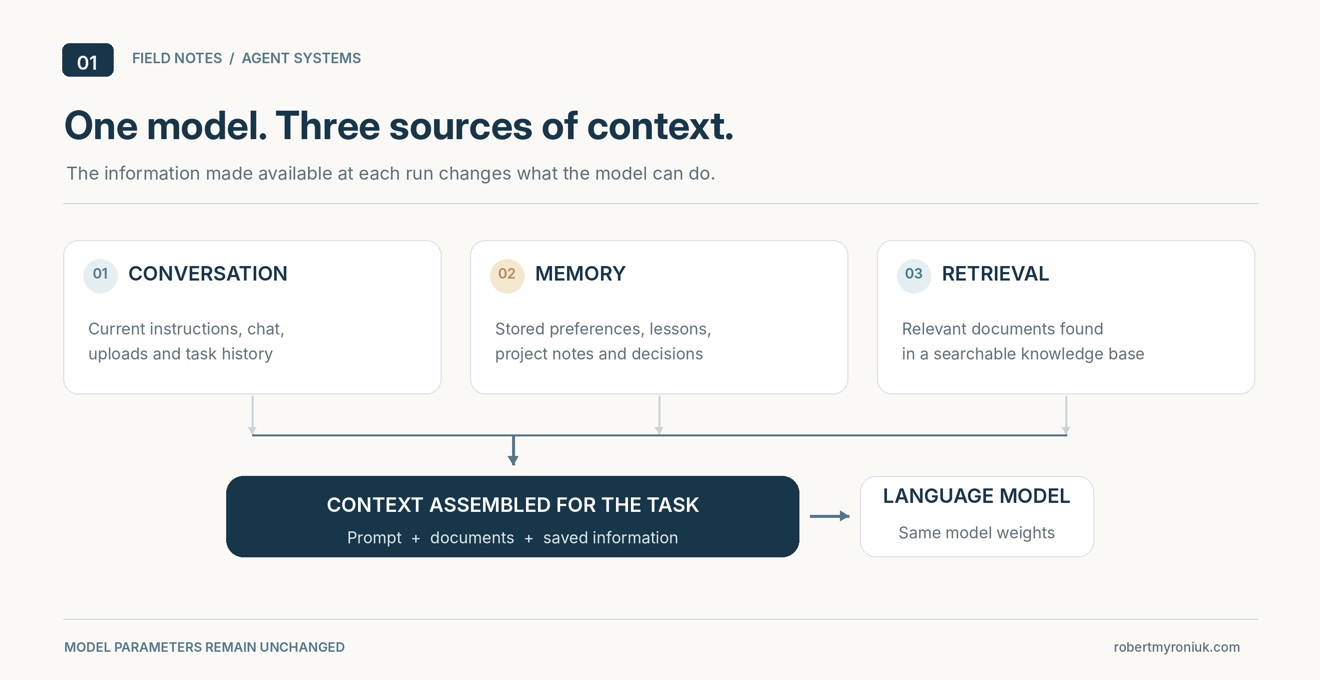
Context can come from three places:
The conversation. Everything you’ve typed or uploaded in the current chat. This is the model’s working space, called its context window, and it has a limit.
Memory. The model itself doesn’t remember anything between conversations. Memory features work by having the software save notes, such as your preferences, your projects or a file of instructions, and feed them back into the context the next time.
Retrieval. When there’s too much information to fit, such as a company’s policies, thousands of contracts or a product catalog, the software searches a document store and passes only the relevant pieces to the model. This is called RAG, or retrieval-augmented generation: retrieve the right information first, then generate the answer from it.4 It’s how you ground an agent’s answers in your own data instead of its training.
In every case, the model stays the same. What changes is what you put in front of it.
Skills
Skills are where an agent starts to feel like your own. A skill is a set of instructions, often with examples, reference files or small scripts, that teaches an agent how to handle a particular kind of task, the way a playbook teaches a new employee. You might write one that explains how to build a PowerPoint deck with your company’s branding, or how to write in your style.
Skills are used at the model’s discretion. The agent sees a short description of each skill and loads the full instructions only when a task calls for it, which keeps them from crowding the context window.5 You can also call a skill yourself at any time. In Claude Code or Codex, a request like this one would pull in a presentation skill if one is installed:
“Build me a presentation using the information described above and use our company branding with a professional tone and high-quality graphics and pictures.”
Without a skill, the agent has to what your companies branding looks like. It might know through context who you are and where you work, but it won’t know how to build the correct branding. With a Skill to build a Corporate Branded PowerPoint, it follows instructions that you, a coworker or someone online already wrote and tested. Either way you end up with a presentation, but its quality depends on the skills, the context and the capability of the model. One distinction to keep in mind: a skill teaches an agent how to do something, but it doesn’t give the agent new abilities such as searching the web or reading your email. Those come from tools.
Tools and MCP servers
Another way to extend an agent is to connect it to MCP servers. MCP, the Model Context Protocol, is an open standard that lets any agent connect to outside software the same way.6 Think of it as a universal adapter: the MCP server sits on top of a product’s API and offers the agent a set of tools, actions it can take, each with a description of what it does. The model reads those descriptions and decides when to use them.
MCP servers are most useful with branded software. Google, for example, now offers dozens of official MCP servers across Google Cloud and Google Workspace.7 Its Gmail server gives an agent nine tools, including ones to search your threads, read messages, manage labels and create drafts.8 Notably, it can’t send email; a human still has to press send. Instead of building those integrations yourself, you connect the agent to Google’s server, and once it’s set up, the agent can work in your inbox. Maybe your first agent should sort all that unwanted email you receive?
Please note: Not every MCP server comes from the brand it connects to. Many are built by individuals or third-party companies, and most are made in good faith, but not all. Connecting an MCP server means trusting it with access to your data, and a malicious one could misuse that access or hide instructions in its tool descriptions for your agent to follow. Before connecting one, check who publishes it: prefer servers from the vendor’s own website or official GitHub account, give it only the permissions it needs, and be wary of any server that asks for more access than its job requires.
The harness
If the model is the brain, the harness is everything around it that turns it into an agent. At its core, the harness is the runtime: the loop that keeps the agent working until the job is done, the built-in tools for reading files and running commands, the instructions that tell the model how to behave, and the software that manages its context and memory. Claude Code, Codex and Pi are ready-made harnesses, but a harness can also be a simple script you write yourself. The formula is short: model + harness = agent.
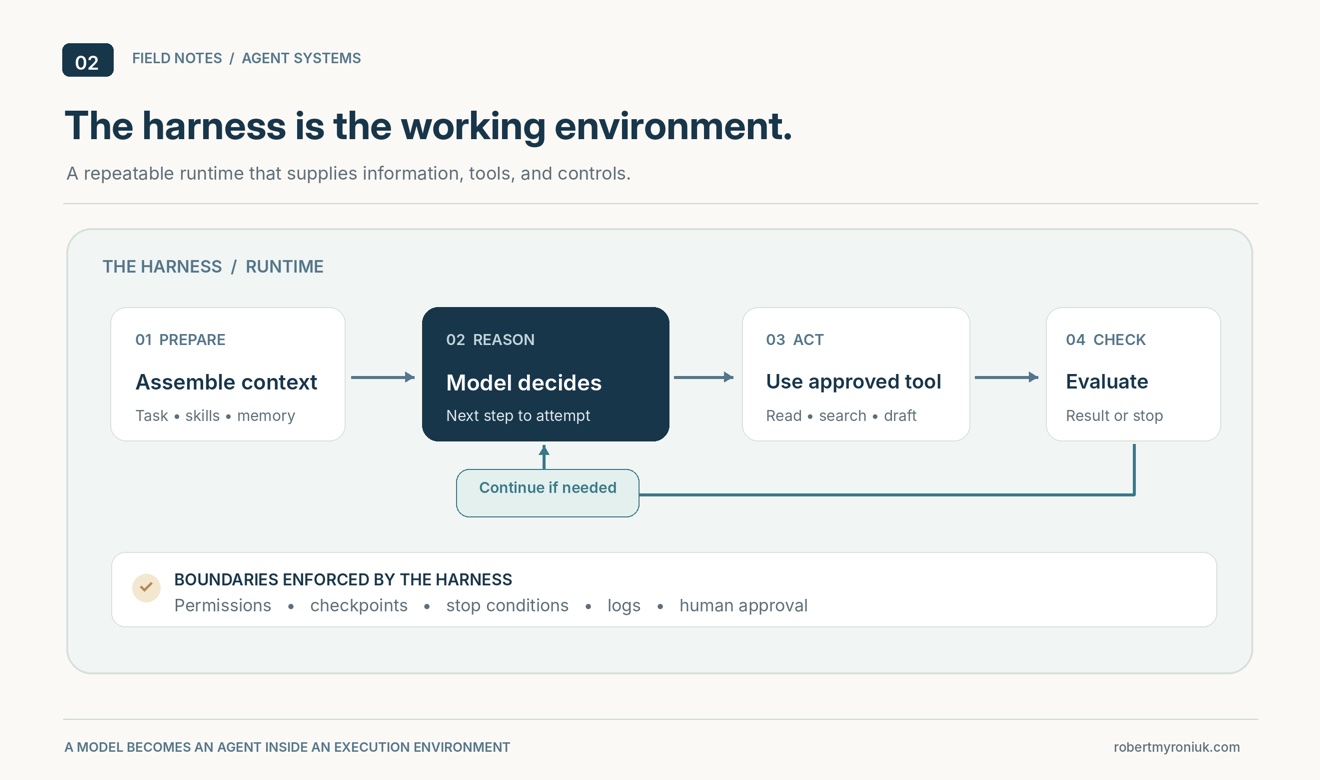
Some developers go further and assemble their own. A popular route is Pi (pi.dev), an open-source harness that’s deliberately minimal: a bare loop and four basic tools that you extend however you like.9 Pair it with OpenRouter, a service that gives one account access to hundreds of models from different labs, and you can swap the brain without changing the harness. It also opens the door to lower-cost models that are still competitive for coding. To see which models are most popular on OpenRouter, check out my LLM Popularity page. That said, I wouldn’t recommend building your own harness until you’re comfortable with how agents work; Claude Code and Codex are the better place to start.
It’s also easy to confuse the harness you build with and the harness your agent runs in. You might use Claude Code or Codex to build your agent, but those are the harnesses for the coding agent helping you. The agent you build gets its own harness: a runtime plus the code, skills, context and MCP servers that make it work. Once it’s finished, it runs on that harness without Claude Code or Codex, unless you deliberately build it on top of one, as some developers do with the Claude Agent SDK.10 Claude Code is one harness among many.
Self-improvement
This is where agents start to seem like they’re learning. A harness without self-improvement keeps doing exactly what it was built to do. To expand what the agent can do, you’d have to update and patch the harness yourself, which is time-consuming. A self-improving agent does some of that work on its own.
The key point: the model never changes. There’s no retraining. The brain stays the same, and the agent improves its own environment, the harness. It does this by measuring how well it’s doing, trying better versions of some part of the harness, and keeping what works. The parts it can improve fall into four layers:11
Context. The text the model reads: prompts, tool descriptions and skills. This is the easiest layer to improve; an agent can rewrite a prompt or refine a skill without touching anything else.
Memory. What the agent retains across tasks: past attempts, lessons learned, which approaches worked. It improves by adding, correcting and consolidating entries.
Metacognition. The routines governing how the agent works: how it plans, tracks progress, chooses tools, and decides when to stop or change course.
Code and tools. The harness’s own software: the code behind its tools and the logic that runs it. This is the most powerful layer to change, and the riskiest.
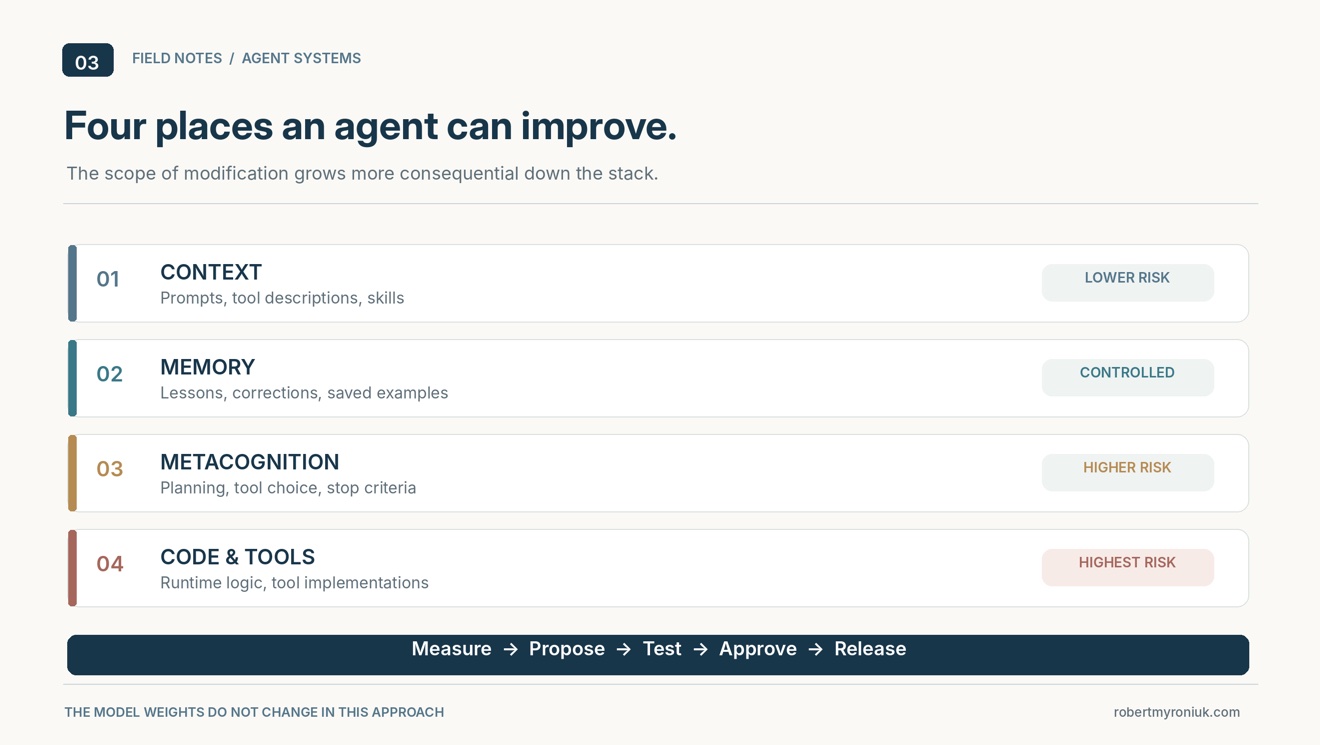
The layers also build on each other. A skill is context, but memory can store it and decide when to retrieve it.
Back to the inbox agent: each time you move an email it got wrong, that’s a signal. A self-improving version would use those corrections to sharpen its skill, so next month it makes fewer mistakes without you rewriting anything.
Self-improvement raises the bar on agent maturity, and the layer an agent can improve says a lot about how mature it is. An agent that refines its own prompts is useful. An agent that can rewrite its own code and tools, often by handing the work to a coding agent like Claude Code or Codex, is something else: software that can find a bug and fix itself. That’s powerful, but it’s also where judgment matters most. An agent that can change its own code can also break it, or quietly lower its own standards. So the same principle from the Gmail example applies: let the agent propose the change, but decide what it may never modify, require tests to pass before any change takes effect, keep a history so you can roll back, and put a human on the final approval.
What it takes to bring one to reality
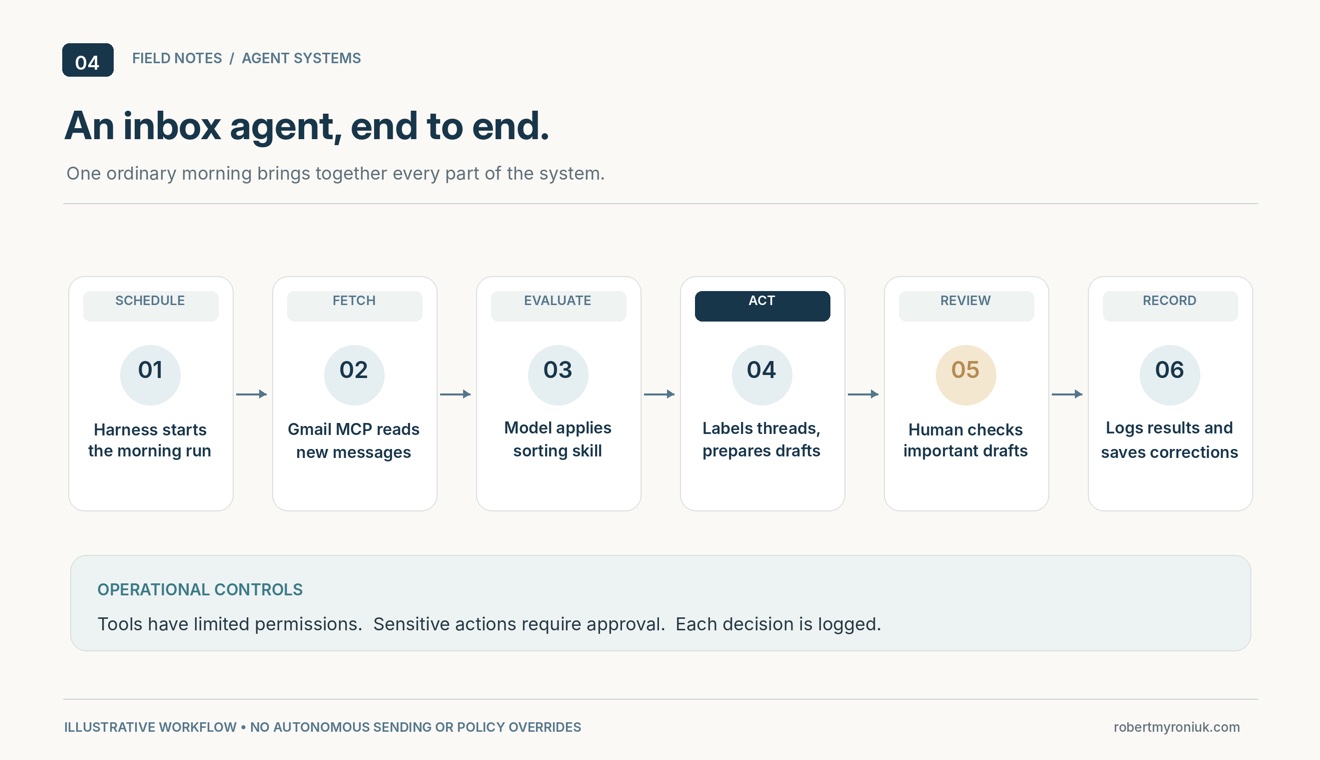
Now the parts fit together. Picture the inbox agent on an ordinary morning. The harness starts its scheduled run and assembles the context: the instructions, the sorting skill, a note from memory that you never want receipts flagged, and the unread messages it pulls through the Gmail MCP server. The model reads that context and decides what to do first. It calls a tool to fetch a thread, weighs it against the skill, applies a label, and saves a draft reply for the one message that needs your judgment. It records the outcome in memory, the loop finds nothing left to do, and the harness writes its log and goes quiet until tomorrow. One routine request touched every part of this essay: the model, the context, a skill, a tool, memory and the harness around them all.
How much of this you need depends on the maturity you are aiming for. Researchers have begun grading agents on autonomy scales modeled on the levels used for self-driving cars: fixed automation at the bottom, rule-based systems above it, LLM-driven agents that reason and use tools in the middle, then agents that add memory and reflection, and at the top agents that learn and improve on their own.12 This essay has been climbing that ladder the whole time. A deterministic workflow with a single model call sits near the bottom, and it is often the right answer. An agent choosing tools inside a governed workflow sits in the middle, which is where most business value lives today. Memory and self-improvement sit above that, and each rung up adds capability along with cost, risk and the oversight to match.
Whatever rung you aim for, the build itself follows the L0–L2 work from the last essay:
- An outcome worth the effort. Agents trade cost and latency for capability, so establish the baseline and the measurable target before anything else.
- The data and controls the agent may use. What it may read, what it may change, and which systems stay authoritative.
- Skills written and tested, so the agent follows a playbook you have approved instead of guessing at one.
- Tools exposed through approved interfaces, whether MCP servers or your own APIs, granted the least access the job requires.
- A harness with checkpoints and logs: stop conditions, human approvals where actions matter, and a record of every run.
- Evaluation before production. Run the agent against cases with known answers until you trust the results, and keep measuring after it ships.
The first two items are the L0 and L1 work from that essay; the rest are what L2 builds and proves. If a use case cannot clear the first item, stop there. A simpler workflow may serve the outcome better than an agent.
Closing
I opened by asking whether agents are really that simple to create and manage. Having built a few, my honest answer is that they are simple to start and demanding to mature. My proof runs in my home lab: a small trend agent wakes on my workstation, researches what changed in the agent world that week, and emails me a ranked digest on Monday morning. A coding agent helped me build it, and I still read its output with a skeptical eye. The maturity you aim for also sets the aptitude you need. A no-code platform can take you a long way: a scheduled agent with approved tools and a human checkpoint on anything that matters. Low-code frameworks add your own skills, memory and MCP connections, with modest scripting. Pro-code tools give the most freedom and flexibility, and you do not have to be a professional developer to use them; I am not one. I would call myself a vibe coder working with pro-code tools: I direct the work and read every change, and the coding agent writes the code. It is a more mature way of building than no-code or low-code, and an agent that rewrites its own harness belongs at that end of the range, because someone has to understand every change it proposes. Pick the smallest agent that would pay for itself, and build it one rung below your ambition. Its logs will teach you what the next rung requires.
Sources
- OpenAI. A Practical Guide to Building Agents. n.d., 4.
- Plan details as of October 2026; prices and included usage change often. Anthropic, “Plans & Pricing.” OpenAI, “ChatGPT Pricing.”
- Erik Schluntz and Barry Zhang. “Building Effective Agents.” Anthropic, December 19, 2024.
- Patrick Lewis et al. “Retrieval-Augmented Generation for Knowledge-Intensive NLP Tasks.” Advances in Neural Information Processing Systems 33 (2020).
- Anthropic. “Agent Skills.” Claude Platform Docs.
- Anthropic. “Introducing the Model Context Protocol.” November 25, 2024. The specification is published at modelcontextprotocol.io.
- Google Cloud. “Supported products” (remote MCP servers).
- Google. “Configure the Gmail MCP server.” Google for Developers. Tool count as of October 2026.
- Earendil. “Pi.” GitHub.
- Anthropic. “Agent SDK overview.” Claude Platform Docs.
- This four-layer breakdown follows Self-Improving Agents (Manning), chapter 1.
- Yu Huang. “Levels of AI Agents: from Rules to Large Language Models.” arXiv:2405.06643 (2024). The scale is modeled on the levels used for driving automation.